Home > Products
Any Audio Converter - Overview
With Any Audio Converter, you can easily convert your video and audio files to MP3, OGG, WAV, AAC, M4A, WMA, AIFF, APE, FLAC, AC3, AU and etc. just within three steps:
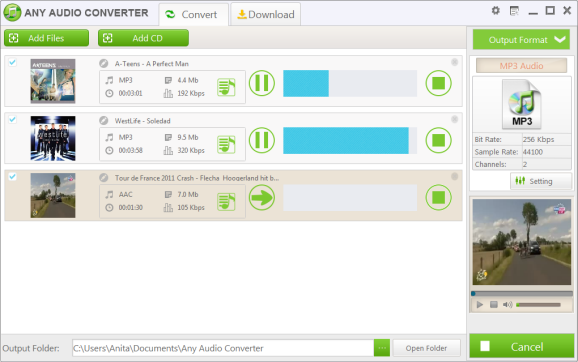
Step One: Add audio and video files
After you run the program, click the "Add Files" button to select audios and videos from your hard drive. You can extract audio from YouTube, Google Video and NicoVideo by pasting the URL links of the online videos or clicking the Download button. After files are added you can trim any part of any file in the Previewing and Trimming Window according to your need.
Step Two: Choose output profile and set output settings
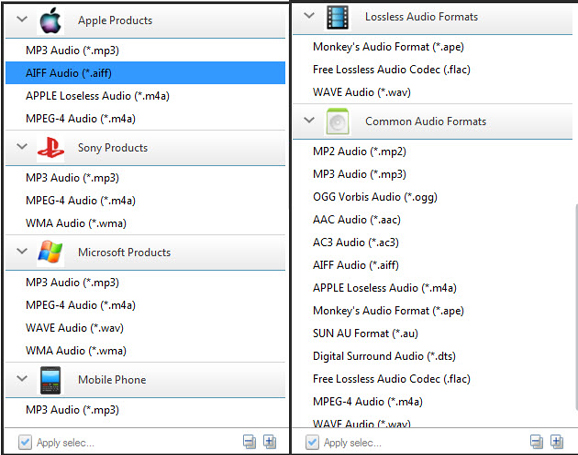
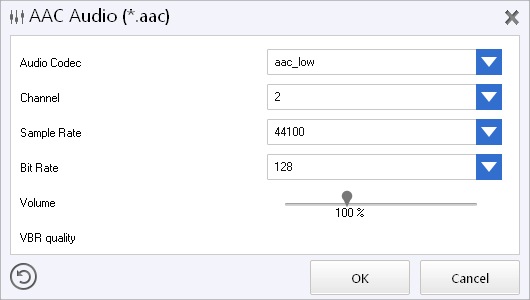
MP3, OGG, WAV, AAC, M4A, WMA, AIFF, APE, FLAC, AC3, AU and etc. audio output formats are available. All settings of the selected output format can be customized by you, as the picture below shows, you can customize audio bitrate, audio sample rate, audio channel. Click "Settings" button in the bottom left of the program for more detailed settings.
Step Three: Start converting and open output folder
When you finish set output format, just simply click the "Convert" button to convert added or selected files to specified format immediately. After the conversion, click the Open Folder button in the bottom of the program to open the output folder.
Any Audio Converter is a versatile audio converter and audio extractor with user-friendly interface and powerful functions. As an audio converter, Any Audio Converter can convert audio between MP3, WMA, WAVE, AAC, M4A and OGG formats as well as convert other unprotected audio formats. As an audio extractor, Any Audio Converter can extract audio from all popular video formats and online videos from YouTube, Google Video and Nico Video.
With this freeware, you can easily convert your audio files to MP3, WMA, WAV such as M4A to MP3, APE to MP3, RA to WMA, FLAC to WAV, etc. You can also extract audio from video clips such as AVI to MP3, MP4 to MP3, WMV to WMA, RMVB to MP3.
Click here to learn more about this free audio converter, and click here to check the screenshots of the program. And it's completely free of charge. Click the Download Now button below to try Any Audio Converter at once.
NoteBurner: Convert any M4P/M4B Music, AA Books to MP3.
Any Audio Converter is free of charge. But it does not support iTunes music or Audiobooks. You may download NoteBurner Audio Converter to convert M4P to MP3, M4B to plain MP3.

Click the Download Now button below to learn more about NoteBurner Audio Converter!